
Click on the different elements in the image to get further information about the watch's visual elements.
Data shown on main screen while running:
- Current time and time zone in UTC difference (local)
- Time for the expected/actual start (local)
- Count down/up (minutes:seconds – when <60 sec only the seconds are shown)
- Currently selected timer number and name
- Battery state
- Sound state
- Vibration state
- Time for first and last boat or finish time for the last 6 registrations.
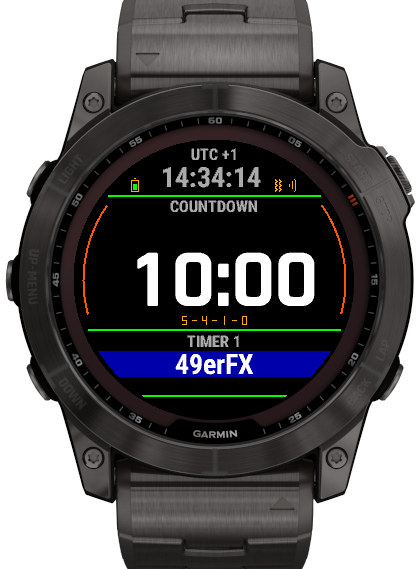
Current timezone
The current time zone in relation to UTC time.
Local time
The current local time (will be used when a timer is started)
Timer name
The name of the selected timer.
The name can be changed both on the watch and in the ConnectIQ app on your phone.
The background color can only be changed in the ConnectIQ app on your phone - normally used to indicate the fleet color.
Count down model
The current count down model - one of the following:
- 5-4-1-0
- 5-4-3-2-1-0
- 3-2-1-0
Changed on the watch under the "Current timer | Count down model"-menu.
Time to start
Time to the start in hours:minutes:seconds
Timer number
The number of the selected timer. This number cannot be changed by the user.
Battery indicator
Shows the watch's current battery status.
When the battery indicator is completely green, the battery is fully charged.
Vibration state
The icon will be grey when the vibration is turned off.
The state can be changed by using the ConnectIQ app on your phone - select the app settings page and "General | Vibration disabled".
Sound state
The icon will be grey when the sound is turned off.
The state can be changed by using the ConnectIQ app on your phone - select the app settings page and "General | Sound disabled".